Last updated 11 August 2026. This page was reviewed on that date. Prices, rates and opening hours change often in Singapore — confirm anything that matters directly with the business before you travel or spend.
Quick answer: Qisahn is the big player with a massive catalogue and solid trade-in deals, while GameMartz does pre-orders right and keeps its regulars happy. For something more personal, Dolly the Shop feels like a neighbourhood hangout, and TOG is where you can grab a new release and a toy figure in one trip. Any of these seven shops will sort you out, whether you are chasing the latest AAA title or hunting a retro gem.
If you’re after a tabletop fix, read where Singapore turns game night into a board game store run.

Finding a game shop that suits your plan is mostly about logistics and fit. Some of you are clearing shelf space, some need a repair bench that can handle a tricky disc drive, and others just want to walk in, grab a title, and get on with your evening. These seven spots each solve a different Saturday problem. Pick the one that matches your errand list.
One of 21 guides in Best Online & General Shopping in Singapore — worth a look if you are still weighing options.
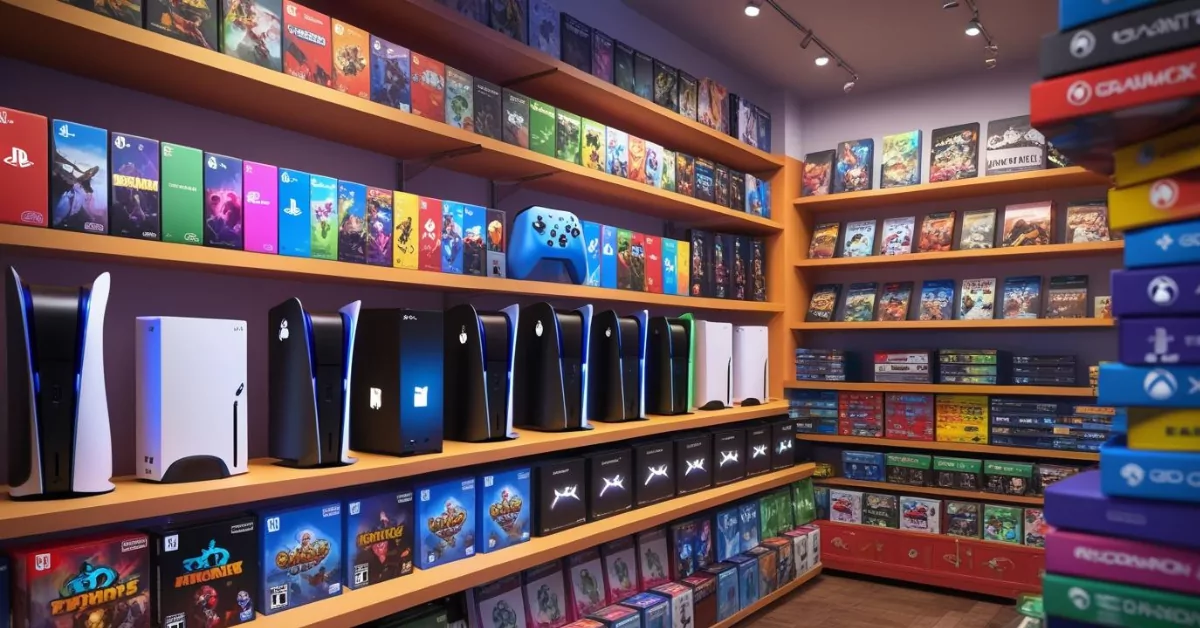
Singapore’s game shops are where plans for Friday night raids get properly sorted. Not just glass cabinets and price tags, but a reason to linger, chat about builds, and maybe walk out with something you did not even know you wanted. Here are the spots worth your weekend.
Qisahn

Tucked on the fifth floor of Far East Shopping Centre, Qisahn is the heavyweight – the largest video game store in the country. Walk in and you will find shelves of Nintendo Switch, PlayStation, and Xbox titles alongside the consoles themselves, plus a trade-in counter that runs like a well-oiled machine. Their price-match policy and regular promotions mean you do not have to shop around sian – just check what they have and you are probably set.
What makes them worth the trip is the sheer depth. They carry everything from day-one releases to pre-owned gems, and the staff are the type who can tell you which indie game you missed without making you feel out of touch. Their repair service handles consoles and devices, and you can also catch them on Shopee, Lazada, and Qoo10 if you are too shagged to head to town.
Address: 545 Orchard Road, Far East Shopping Centre #05-11, Singapore 238882
Phone: +65 3159 3099
Opening hours: 12pm to 8pm daily
Website: qisahn.com
If you want the widest catalogue and a trade-in program that gives you credit without drama, Qisahn is a no-brainer. It suits the serious collector and the casual player alike – basically anyone who hates paying full retail for a game that will be on their pile of shame anyway.
This is your bulk-settle stop. The floor space lets you compare everything in one sweep, and the trade-in counter handles stacks efficiently, so you clear backlog and refresh the shelf in a single trip. Good for when you are doing a pre-weekend household reset and want the errand over with quickly.
GameMartz

Over at Funan, Plaza Singapura, and Bugis Junction, GameMartz has been a steady kaki for gamers for years. They carry the latest for PC, Xbox, PlayStation, and Nintendo Switch, and their pre-order game is strong – you pretty much guarantee your copy on launch day without having to camp at midnight.
The vibe is efficient rather than flashy. You come in, grab what you need, and maybe have a quick chat with someone who actually plays the stuff they sell. Their repair service for consoles and entertainment devices is a bonus; plenty of loyal customers send in their old hardware here because they trust the work. Frequent promotions keep prices honest, and they run an online store via Facebook and Shopitree if you prefer to browse from your sofa.
Address: Funan #03-10, 107 North Bridge Road, Singapore 179105 (also at Plaza Singapura #04-03 and Bugis Junction #03-24B)
Phone: +65 6972 1900 (Funan)
Opening hours: 11am to 9:30pm daily
This is the spot for someone who wants a dependable routine – pre-order the sequel, pick it up on the way to dinner, maybe trade in the old one next month. GameMartz rewards regulars, and that alone builds a community around it.
This list is editorial, not advertising. Run something similar? Tell us what you do and we will take a look.
The islandwide presence means you can slot a visit between other chores at the mall. Their pre-order system suits planners who like to lock in a launch-day copy without midnight timing. Walk in, pick up, maybe pick up new headphones next door—very straightforward, no lingering required.
Dolly the Shop (FunzSquare)

Out in a quiet corner off Hoy Fatt Road, Dolly the Shop is a different kind of game store. It used to be known as FunzSquare, and the regulars never really stopped calling it that. The focus is on PlayStation and Nintendo Switch, with some Xbox 360 stock for the retro faithful, and the real draw is the people behind the counter. They remember you, they remember what you bought, and they give recommendations that feel like a friend telling you about a gem.
It is not a warehouse-sized operation. The range is more carefully selected, but everything there has been picked with care. You will find consoles, games, and accessories, and the service is the kind that makes you drive a little further just to say hi. Need something specific? Drop them a message and they will try to bring it in for you.
Address: 28 Hoy Fatt Road, Singapore 151028
Phone: +65 9105 9866
Opening hours: Mon–Fri 12pm to 6pm, Sat 12pm to 7pm, Sun closed
Website: dollytheshop.com
This one is for the gamer who wants a personal touch. If you are tired of faceless chains and prefer a place where the auntie knows your gaming taste better than your own sibling, Dolly the Shop is your kind of joint. It also rewards the weekend explorer willing to travel a bit for a more intimate experience.
If your setup could use a tactile upgrade, have a look at our guide to Mechanical Keyboard Shops in Singapore.
A spot for when you want the recommendation to come with context. The quiet corner location off Hoy Fatt Road means you are not battling mall crowds, and the conversation at the counter tends to be about what you actually enjoy playing. Go when the agenda is discovery, not just pickup.
Gamewerks

Gamewerks sits inside a Clementi Avenue 3 shophouse and has carved out a name for itself by doing the things the big boys sometimes overlook. They stock consoles and games for PlayStation, Xbox, Nintendo Switch, and even handhelds like the DS and 3DS, but their repair service is what keeps the regulars coming back. Their repair bench can handle a wide range of issues – screens, fans, disc drives – and they have a steady reputation for getting hardware back into play.
Beyond repairs, the crew is good at tracking down hard-to-find games and accessories. If you have been hunting a specific edition for months and the online marketplaces are ridiculous, try asking here first. They also sell through Telegram and Carousell for those who want a quick deal without leaving the house. Hours run from noon to 9pm daily, which fits the after-work scramble nicely.
Address: 443 Clementi Ave 3 #01-79, Singapore
Phone: +65 6779 0646
Opening hours: 12pm to 9pm daily
Gamewerks is the shop you visit when your hardware needs saving and your patience has run out. It is solid for the practical gamer who values a working console over flashy displays, and the kind of place that turns a repair job into a reason to come back for your next purchase.
This is the one you head to when a console or handheld needs attention the big chains cannot give. The shophouse setup in Clementi keeps the focus on the repair bench, and the turnaround is practical. Slot it in before your market run—drop the device, grab your groceries, swing back.
GameXtreme

With branches across the island – from Tampines Mall to other neighbourhood malls – GameXtreme is a familiar face for many Singaporean gamers. They cover PC, Xbox, PlayStation, and Nintendo Switch, and run what they bill as the largest trade-in platform in Singapore. That means you can walk in with a stack of old games and walk out with credit toward something new, or just sell outright if you need the shelf space.
Repairs are another big part of their service, covering consoles, handhelds, laptops, and even gaming PCs. Their Tampines outlet is easy to find, and the chain’s network means you are never too far from a service counter. The range of consoles and accessories is broad enough that you rarely leave empty-handed.
Address: Tampines Mall #04-10/11, 4 Tampines Central 5, Singapore 529510
Phone: +65 9146 6246 (Tampines)
Opening hours: 11:30am to 9:30pm daily
Website: gamextreme.sg
GameXtreme is suited for the gamer who values convenience and a reliable trade-in ecosystem. If your collection grows too fast and you need a physical spot to recycle your backlog, this is where you go – no fuss, straightforward credit, and a decent excuse to treat yourself to the next big title.
This list is editorial, not advertising. Run something similar? Tell us what you do and we will take a look.
Useful when the assignment is clearing out old cartridges and discs. Their trade-in platform accepts a wide range, so you can turn a stack from different consoles into credit in one go. The neighbourhood mall locations put it on your way, not out of your way—ideal for a quick, unglamorous errand.
TOG – Toy Or Game

Strolling into a TOG outlet – whether at Bugis+, Causeway Point, JEM, or Plaza Singapura – feels a bit different because it is not just about video games. They are the largest retail chain for both games and toy figures in Singapore, so one half of the store has the latest PlayStation, Xbox, and Nintendo titles, and the other half is packed with collectible figurines and trading cards. Kids and parents end up here together, and neither leaves bored.
Their stores are well-organised, the pricing is clear, and the staff keep things family-friendly. End-of-year sales tend to throw up good deals on both games and toys, and the sheer number of outlets means you can pop in anytime. The trading card section alone draws a steady crowd of collectors on weekends.
Address: Bugis+ #05-04/05/06, Victoria Street, Singapore 188067 (plus locations at Causeway Point, JEM, Jurong Point, Plaza Singapura, Suntec City, Tampines Mall)
Phone: +65 6634 2637
Opening hours: 11am to 9pm daily
Website: toyorgame.com.sg
TOG is the spot when you are bringing the family along or when your gaming fix and your figure collection are in the same budget. It is roomy, bright, and easy to navigate, so even the most impatient small person can find something to keep them occupied while you browse.
If board games are more your speed, our list of Online Board Game Stores in Singapore for Discerning Gamers might be just the thing for your next game night.
The multi-purpose stop for households with split interests. One side covers the game list, the other handles figurines and trading cards, which means you might check off two gift lists at once. A practical choice when you are hosting and need something for the cousins to do besides screen time.
PLAYe

Authorised by Sony PlayStation, Nintendo, and Xbox, PLAYe operates both online and through physical stores like the AMKHUB branch in Ang Mo Kio. Their product lineup spans the usual consoles and games, plus action figures and trading cards for those who like their hobbies to overlap. The website runs smoothly, so if you already know what you want, the online checkout is a quick affair.
Their range is broad, covering everything from day-one releases to collectibles that can be hard to find elsewhere. The AMK outlet stays open till 10pm, which is handy for late-night errand runs, and the staff generally know the stock well enough to point you towards something new. While the physical shop is smaller than some chains, the combined online-offline model gives you flexibility – browse from home, pick up in store, or just wait for delivery.
Address: AMKHUB #02-30/31, 53 Ang Mo Kio Ave 3, Singapore 569933
Phone: +65 6456 6672
Opening hours: 11am to 10pm daily
Website: play-e.com
PLAYe appeals to the gamer-collector who values convenience and an authorised source. If you are the sort who pre-researches what you want and just wants to secure it without the mall crowd, their online store is a steady companion. It also works well for north-siders who can swing by AMKHUB after work.
GAMES HOME

Games Home, (a sole proprietorship registered 18 July 2007) is an online retailer for video games, consoles, and accessories, also selling via Amazon.sg. ACRA-sourced registry records confirm the business is live; its registered address (Woodlands) is a back-office/fulfilment address, consistent with the business’s online-only model — no physical storefront, as the original listing itself noted.
You’ll never need to chope a parking spot or squeeze past a display of Funko Pops. This one exists in the void between your Amazon cart and a cardboard box left at the door. The whole experience is a search bar and a tracking number—ideal for someone who’d rather tapau the transaction and get back to playing. Romance is dismissed immediately; what you gain is a distinct lack of human intervention between you and a new controller.
Products or Services:
Games Home offers video games across PlayStation, Xbox, Nintendo Switch, and PC, plus accessories including controllers, headsets, and racing seats, with customization options for peripherals.
Contact Information & Location:
Games Home operates online only, with no physical store.
- Phone: +65 9103 3781 (10am-10pm)
- Email: [email protected]
For a pure online play, bookmark both their store and Amazon.sg. Prices sometimes shift, and a weekday afternoon refresh can surface a friendlier number before the weekend crowd. No agak agak guesswork—just a direct, tidy checkout. Suits the fellow who checks twice, buys once.
Website: Games Home

PLAY-E Pte. Ltd., (incorporated 18 May 2015), bills itself as an authorized retailer for PlayStation, Nintendo, and Xbox, alongside action figures, trading cards, and collectibles, with stores at AMK Hub, Bedok Mall, and VivoCity. Finding, disclosed: ACRA-sourced registry records currently show this company’s status as “Gazetted To Be Struck Off” — a formal notice that ACRA intends to deregister this entity. Despite this, independent corroboration confirms all three stores and the PLAY-E website are still actively trading as of July 2026 (current stock, functioning checkout, no closure notices found). This is a genuine registration-status flag worth knowing, particularly for anything requiring the company’s continued existence (warranties, store credit, gift cards) — we’d recommend confirming current status directly with a store before a purchase that depends on long-term backing.
Walking into a mall outlet is less a pilgrimage, more a quick detour between a kopi and a grocery run—convenient, bright, and dangerously stocked with trading cards you didn’t plan to buy. The consoles sit a little too comfortably beside action figures, which might unsettle a purist. But if your gaming identity includes a shelf of collectibles, the blend feels natural. Someone looking solely for a quiet, specialist den might dismiss the pop-culture buzz.
Products or Services:
PLAY-E offers the latest video game releases for PlayStation, Xbox, and Nintendo Switch, PC games, gaming accessories, and a range of action figures, trading cards, and geek-culture merchandise.
Contact Information & Location:
PLAY-E has three physical stores in Singapore:
- AMK Hub: 53 Ang Mo Kio Ave 3, #02-30/31, Singapore 569933, Mon-Sun 11am-10pm
- Bedok Mall: 311 New Upper Changi Road, #B1-17, Singapore 467360, Mon-Sun 11am-9:45pm
- VivoCity: 1 HarbourFront Walk, #02-36, Singapore 098585, Mon-Sun 11am-9:45pm
With three outlets from Ang Mo Kio to HarbourFront, this is your go-to when you want to physically browse and collect on the spot. The AMK Hub location, in particular, tends to be the sleeper hit—less footfall during weekday lunch hours means you get attentive service and first dibs on fresh trading card drops.
Website: PLAY-E | Facebook: PLAY-E
If the convenience of browsing from your sofa is winning, explore the best online board game stores for Singapore families.
Update, August 2026: this business is no longer operating.
GAMEXTREME@TAMPINES PTE. LTD.

GameXtreme@Tampines Pte. Ltd., (incorporated 18 November 2014), buys, sells, repairs, and trades video games, consoles, and gadgets. ACRA-sourced registry records confirm the company is live, with a principal activity of games and toys retail — an exact match. Its registered address (Tampines) is a back-office address, differing slightly from the retail store below.
The trade-in counter is the only monument that matters here. This is a workshop disguised as a shop, where the scent of isopropyl alcohol and old inventory hangs politely in the air. Expect a conversation about capacitor issues before you ever discuss a game’s plot. Dismiss any hope of a spotless showroom; the real transaction is the judgment call on your used console’s value, delivered with the deadpan precision of a kopitiam uncle assessing your lunch choice.
Products or Services:
GameXtreme offers new and pre-owned games/consoles for PlayStation, Xbox, Nintendo Switch, and PC, gaming accessories, and repair services for phones, tablets, laptops, and consoles.
Contact Information & Location:
- Tampines Mall: 4 Tampines Central 5, #04-10/11, Singapore 529510, Tel: +65 9146 6246, Mon-Sun 11:30am-9:30pm
- Yishun Northpoint: 1 Northpoint Drive, Northpoint City South Wing, #B2-124, Singapore 768019, Tel: +65 9459 2346, Mon-Sun 11:30am-9:30pm
- General Inquiries: +65 8798 1793 (11:30am-9:30pm), [email protected]
The trade-in and repair desk is where the real value lives. Bring in your dusty console or a stack of finished titles, and walk out with credit toward the next big release. Late afternoon on a Tuesday is the sweet spot—technicians have wrapped morning jobs and can turn small fixes around while you lepak at a nearby kopitiam.
Website: GameXtreme
GENERATION GAMES

Generation Games, (a business partnership registered 3 September 2009) is a neighbourhood game shop for PlayStation and Nintendo Switch titles, plus trading cards. ACRA-sourced registry records confirm the business is live, with a principal activity of games and toys retail — an exact match; its registered address matches the store below exactly.
A neighbourhood shop where the owner might remember you traded in a Switch Lite three years ago—that kind of quiet continuity is a feature, not an accident. The stock feels curated by someone who actually plays, not just by a spreadsheet. Dismiss the idea of a midnight launch crowd; this is the place you wander into for a new Pokémon booster and leave with a half-hour chat. For the kiasu collector, it’s too slow, but for anyone who misses void-deck card battles, it’s shiok.
Products or Services:
Generation Games offers new and classic titles for PlayStation and Nintendo Switch, gaming accessories, and trading cards including Dragon Ball Super Card Game, Pokémon TCG, Final Fantasy, and Battle Spirits.
Contact Information & Location:
- Address: 82 Marine Parade Central, #01-622, Singapore 440082
- Phone: +65 6342 0889
- Operating Hours: Daily 1:30pm-8:30pm
This neighbourhood shop rewards those who make it their regular haunt. Strike up a conversation during a quiet weekday morning and you might just get a heads-up on incoming restocks or trade-in promotions. It’s the kind of place where loyalty quietly returns the favour, no need for any fanfare.
Website: Generation Games
How to choose
Start by asking what you truly need right now. If you are after the widest selection and a fast trade-in loop, choose a store like Qisahn or GameXtreme where the turnaround for credit is quick and the catalogue is deep. Pre-orders matter? GameMartz makes launch-day collection a simple routine. For hardware fixes or tracking down an out-of-print title, Gamewerks is the practical choice. Personal service? Dolly the Shop gives you that kampung spirit. Collectors and families gravitate toward TOG and PLAYe, where toys, cards, and games sit under one roof.
Price-wise, a new release console in Singapore typically runs between $400 and $600, with games ranging from $50 to $90. Do not be shy about asking for trade-in values or checking for bundle deals – many shops run seasonal promotions that knock a fair bit off the total. Think about location, too; if you will be dropping in regularly, a branch near your usual route saves time and petrol.
Finally, check whether the shop offers online ordering, repair services, or WhatsApp support – these small extras make a big difference when your controller acts up on a Sunday afternoon.
| Store | Best For | Key Services | Platforms | Locations |
|---|---|---|---|---|
| Qisahn | Largest range and trade-in deals | Trade-in, repair, online sales | Nintendo Switch, PlayStation, Xbox, PC | Far East Shopping Centre |
| GameMartz | Pre-orders and frequent promotions | Pre-order, repair, online via Facebook & Shopitree | PC, Xbox, PlayStation, Nintendo Switch | Funan, Plaza Singapura, Bugis Junction |
| Dolly the Shop | Personalised, loyal service | Selected games, personalised recommendations | PlayStation, Nintendo Switch, some Xbox 360 | Hoy Fatt Road |
| Gamewerks | Repairs and sourcing rare items | Repair, online via Telegram & Carousell | PlayStation, Xbox, Nintendo Switch, DS, 3DS | Clementi Ave 3 |
| GameXtreme | Islandwide trade-in and multiple outlets | Trade-in, repair | PC, Xbox, PlayStation, Nintendo Switch | Tampines Mall and multiple other branches |
| TOG – Toy Or Game | Family-friendly gaming and collectibles | Games, toy figures, trading cards | PlayStation, Xbox, Nintendo | Bugis+, Causeway Point, JEM, and more |
| PLAYe | Online convenience and authorised collectibles | Online and physical store, authorised dealer | PlayStation, Xbox, Nintendo | AMKHUB and other branches |
Summary
The game shops here cover every angle: massive inventory, no-nonsense trade-ins, repair gurus, and even a place where the staff remember your PSN avatar. Whether you are building a collection or just need a new controller before the weekend raid, one of these seven will sort you out. Pick the store that matches your style and make it part of your regular rotation.
All information is accurate at the time of writing but details can change. Please confirm directly with the shop before making a special trip.
Read next
Frequently asked questions
Suits the researcher who has already done the homework online. Their web platform is clear, so if you know the exact title, you can confirm stock and swing by the AMK outlet for a rapid pickup. Also a tidy option when the household hobbies include both gaming and trading card collections.
Which game shop in Singapore has the best trade-in programme?
Qisahn and GameXtreme are both known for straightforward trade-in services. Qisahn offers competitive credit and a price-match policy, while GameXtreme runs the largest trade-in platform on the island.
Where can I get my console repaired?
Gamewerks specialises in console and handheld repairs, and GameXtreme also handles repairs for consoles, laptops and gaming PCs. GameMartz and Qisahn provide repair services for gaming devices as well.
Which shop is best for pre-ordering new releases?
GameMartz has a strong pre-order system with frequent promotions. Qisahn also accepts pre-orders and usually stocks a large number of launch-day copies.
Are there shops that sell both video games and collectible toys?
TOG – Toy Or Game and PLAYe both carry video games alongside action figures and trading cards. TOG is the largest chain in Singapore for this combination, while PLAYe is authorised by Sony, Nintendo and Xbox.
Where can I find a more personal, small-store experience?
Dolly the Shop in the West offers a carefully chosen selection and highly personalised service, with staff who remember regulars. Gamewerks also feels like a neighbourhood specialist, particularly for repairs and rare finds.
Do these shops have online stores?
Most do. Qisahn sells on Shopee, Lazada and Qoo10; GameMartz operates via Facebook and Shopitree; Gamewerks uses Telegram and Carousell; PLAYe has a full online store. GameXtreme and TOG also sell online through their websites.