Last updated 7 August 2026. This page was reviewed on that date. Prices, rates and opening hours change often in Singapore — confirm anything that matters directly with the business before you travel or spend.
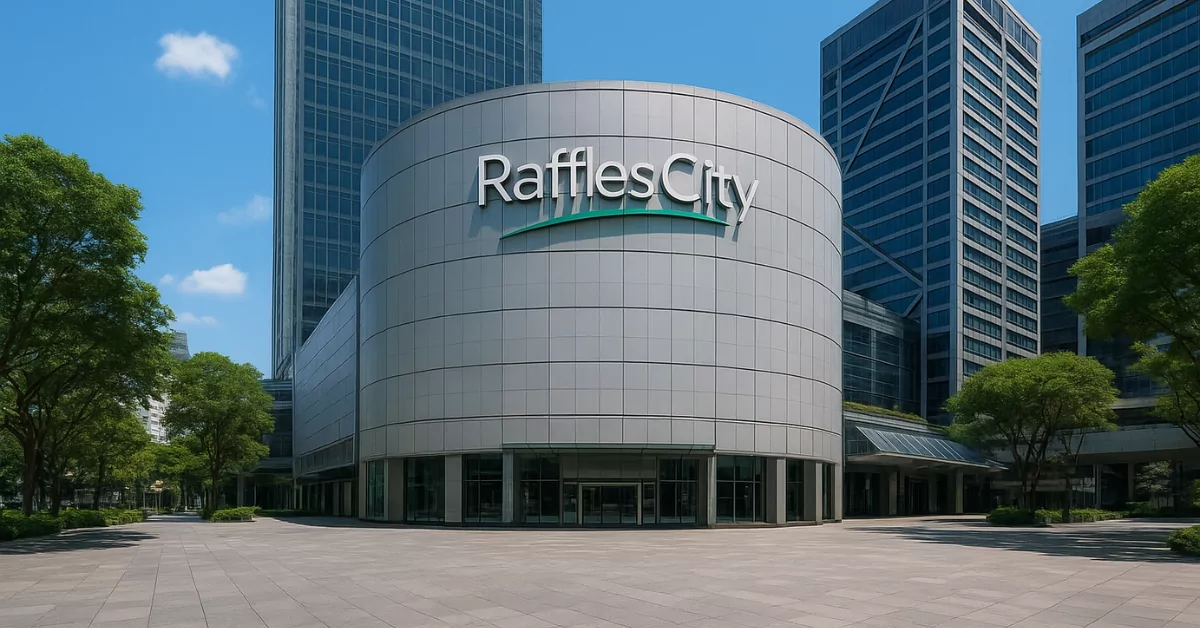
Quick answer: Raffles City isn’t just a transit point—it’s where you’ll find Wo Wo Dian’s century-old Sichuan buns, Casa Vostra’s 36-hour fermented pizzas, and Omoté’s fat chirashi bowls. For a long, noisy dinner over Spanish tapas, MoVida does the job; when you want ramen that’s earned a Michelin nod every year since 2017, head to Mensho Tokyo. Each spot brings something different, whether you’re eating solo or rounding up a group.
If your meal plans centre on Raffles Place beyond Raffles City, you’ll appreciate our guide to Raffles Place restaurants for all occasions.

Getting a group of different appetites and attention spans through a meal downtown can feel like a strategic operation. These Restaurants In Raffles City take the edge off that planning. Each one gives you a reason to linger, a table large enough for the family, and at least one dish that’ll become the story everyone retells on the ride home. You book the slot; the rest flows.
If none of these quite fit, Best Food in Central Singapore & the City has 70 lists covering the rest of the category.
Wo Wo Dian

Wo Wo Dian sits in the basement of Raffles City, carrying a legacy from Sichuan that stretches over 130 years back to the Qing Dynasty. The kitchen still makes their buns and rice noodles by hand, the same way they have for generations. You come for the Traditional Pork Bun ($8.90++)—juicy, fluffy, and worth every cent—or the Classic Chicken Broth Rice Noodles ($14.90++), where the broth is clean and the noodles are shipped in from Mianyang for a silkier slip. The operation is small, the queue moves fast, and you’ll likely be thinking about that bun on your Grab ride home.
When grandparents are part of the outing, this is the sure-win stop. The setting is calm and the aircon is steady, which already solves half the battle. Staff move efficiently, so the hand-pulled noodles arrive fast enough to keep younger kids from getting restless. It’s the kind of straightforward, warm meal that anchors a relaxed weekend stroll through the mall.
Address: #B1-13/14/15, Raffles City Shopping Centre, 252 North Bridge Road, Singapore 179103
Hours: Mon–Thu 11:30am–9pm, Fri–Sun 11:30am–10pm
Phone: +65 6513 5598
Price: Buns from $8.90, noodles from $14.90
Website: wowodian.sg
Casa Vostra

Casa Vostra is the kind of Italian spot that makes you forget you’re inside a shopping centre. Chef Antonio Miscellaneo runs the show, and his pizzas rest on dough that ferments for 36 hours—you taste that effort in every chewy, blistered edge. The Tartufo e Funghi Pizza ($28++) with black truffle and mushrooms is a quiet crowd-pleaser, while the Crab Tagliatelle ($26++) brings sweet crab into a rich tomato confit. It landed a spot on the 50 Top Pizza Asia-Pacific list in 2023, so you’re in steady hands whether it’s a casual lunch or a date night you don’t want to overthink.
Book a birthday lunch here when you need noise and joy to feel genuinely welcome, not managed. The open kitchen gives restless toddlers something to watch, and the pizza’s blistered crust becomes the moment everyone at the table nods at each other, mouths full, the outing officially a success. Ask for a booth if you need to corral a wandering little one.
Address: #01-49/50/51, Raffles City Shopping Centre, 252 North Bridge Road, Singapore 179103
Hours: Daily 11:30am–10pm
Phone: +65 9780 5362
Price: Mains $26–$28
Website: casavostra.sg
None of these are sponsored placements. If you belong on this list, tell us what you do.
When you seek a peaceful meal for one away from group bookings, you might enjoy the calm of our picks at restaurants in Suntec City.
Omoté

Omoté takes Japanese comfort and gives it a Korean-Japanese twist that works without feeling gimmicky. The Tamago Mentai Chirashi ($21.80++) arrives piled with salmon, tuna, and ikura—generous enough to make you pause before adding soy sauce. If you prefer something warm, the Grilled Salmon Teriyaki Don ($28.80++) and Unagi Kabayaki Don ($25.80++) are staples that regulars keep coming back for. Service is quick, the portions are honest, and the price point leaves you room to add a side without sweating the bill.
Ideal for the parent who needs a quick, quality dinner with a child who only eats one colour. The chirashi bowls are generous and arrive looking like a celebration, which helps distract a tired preschooler. Tables turn over smoothly, so you can settle the bill and head upstairs to the outdoor play area before anyone’s mood runs out of steam.
Address: #B1-03, Raffles City Shopping Centre, 252 North Bridge Road, Singapore 179103
Hours: Daily 11am–10pm
Phone: +65 9899 3670
Price: Mains $21.80–$28.80
Website: omote.sg
Mensho Tokyo

Mensho Tokyo is Chef Tomoharu Shono’s playground for ramen that doesn’t sit still. The Toripaitan ($28++) is rich and creamy, with chicken broth and slices of A5 Wagyu that go way beyond what you’d expect from a bowl of noodles. The Singapore-exclusive Chilli Crab Ramen is a love letter to local taste, while the A5 Wagyu Shoyu Aburasoba ($41++) dials up the luxury. The noodles are thick and wavy, the kind that hold onto every drop of broth, and the Michelin Guide has nodded at them every year from 2017 to 2024. It’s not your everyday bowl, but for a treat it’s proper.
Bring your teenager here when they’ve outgrown kids’ menus but still want a meal that feels like an event. The broths are rich and the noodles have the right chew, sparking actual conversation instead of phone-scrolling. It works best as a one-on-one date—just you and one child—where you can watch them discover a new favourite without younger siblings rushing the moment.
Address: #03-43, Raffles City Shopping Centre, 252 North Bridge Road, Singapore 179103
Hours: Daily 11am–10pm
Phone: +65 8380 8467
Price: Mains $28–$41
Website: instagram.com/menshotokyo.sg
MoVida

MoVida brings Melbourne’s Spanish obsession to Singapore with a produce-first attitude that chef Frank Camorra has been refining for years. This is where you order multiple small plates and let the table fill up with things like Cecina ($32++), air-cured Wagyu sliced thin, and a Paella De Señorito ($75++) loaded with bomba rice and fresh seafood. It’s built for groups who like to share and talk over food for hours. The kitchen won Dish of the Year from the Age Good Food Guide, and the energy here on a Friday night can make you forget you’re in a mall.
For a long, easy dinner with your own siblings or old friends, the kind where you’re not cutting anyone’s food, this is the place. The small plates arrive in waves, which naturally stretches the evening. You can book a later slot after the kids are down, and the noise level means your laughter won’t draw a single side-eye.
Address: #03-43, Raffles City Shopping Centre, 252 North Bridge Road, Singapore 179103
Hours: Daily 12pm–10pm
Reservations: Via website
Price: Mains $32–$75
Website: movida.sg
Gyukatsu Kyoto Katsugyu

Gyukatsu Kyoto Katsugyu specialises in just one thing—beef cutlets—and it’s Japan’s most recognised name for it. You get a personal stone grill at your table and cook the Sirloin and Beef Tongue Gyukatsu Zen ($32++) to the exact doneness you like, dipping each piece into Kyoto-style curry or cracking an onsen egg over the top. The beef is lean, medium-rare inside with a crisp coating, and there are prawn katsu options if someone in your group doesn’t eat beef. Queues form early because the concept is fun and the meat is tender in a way that makes you slow down. Last order is 9pm, so plan accordingly.
A solid pick when you need a meal that doubles as an activity. Each person grilling their own beef cutlet at the table resets the pace, keeping fidgety hands busy. The set meals are clear and contained, which works well for children who like to control their own plate. Come at an off-peak hour to skip the queue, because hungry waits here are jialat for everyone.
Address: #B1-63/64, Raffles City Shopping Centre, 252 North Bridge Road, Singapore 179103
Hours: Daily 11am–10pm (last order 9pm)
Phone: Check website
Price: Mains from $32
Website: gyukatsu-kyotokatsugyu.com.sg
None of these are sponsored placements. If you belong on this list, tell us what you do.
If you’re eating your way around the island, our guide to Vegetarian Restaurants in Little India, Singapore is a good next stop. Or if clubby vibes are more your thing, see the Restaurants on Club Street in Singapore.
Prego

Prego has been doing Italian at the Fairmont Singapore since 1986, so it’s seen every food trend come and go and just keeps doing what works. Chef Davide Bizzarri leans on house-made pastas and wood-fired pizzas like Sapori di Bosco ($44++)—truffle, porcini, and a crust with proper char. The Linguine Astice e Burrata ($58++) is a lobster-and-burrata situation that feels like a small celebration on a plate. It’s accessible through Raffles City but sits inside the hotel, so the mood is a notch more polished, useful when you want someone else to handle a birthday dinner or a long-overdue catch-up.
When you’re celebrating a milestone with the whole extended crew, Prego’s decades of calm experience take the pressure off. The service is practiced at handling large groups, and the space feels occasion-worthy without being hushed. A child’s spaghetti mishap here barely registers; they’ll simply sweep in with a fresh napkin and a warm smile, letting you get back to your lobster linguine.
Address: Level 1, Fairmont Singapore, 80 Bras Basah Road, Singapore 189560 (accessible from Raffles City)
Hours: Daily 12pm–10:30pm
Phone: +65 6431 6156
Price: Mains $44–$58
Website: prego.com.sg
How to choose
Think about the kind of meal you actually want, not just the cuisine. If you’re grabbing a quick solo lunch that doesn’t feel sad, Wo Wo Dian or Omoté will sort you out for under $30. For a date where the food does most of the talking, Casa Vostra or Prego bring the right mix of effort and ease—Prego a touch more formal, Casa Vostra more relaxed. When you’ve got a group that can’t agree on where to eat, MoVida’s tapas format means everyone picks a bit of what they fancy. Mensho Tokyo is for days when only a rich, slurp-worthy ramen will do. And Gyukatsu Kyoto Katsugyu is the one to pick when you want an experience, not just a meal—grilling your own cutlet at the table is half the fun, but the queues mean you should go early or be prepared to wait.
Prices here range from under $10 for a bun to about $75 for a big paella. Most sit comfortably in the $20–$40 range for a main. Reservations are smart for MoVida and Prego; the others accept walk-ins, though Gyukatsu’s queue is real. All are inside Raffles City Shopping Centre or directly attached, so there’s no sweat about getting there.
Timing makes a big difference too. Wo Wo Dian closes earlier on weekdays (9pm), so if you’re after a late dinner on a Monday, skip it and head to Omoté, which stays open until 10pm daily. Gyukatsu Kyoto Katsugyu takes its last order at 9pm sharp—arrive by 8:15pm if you want to grill your cutlets without rushing. Casa Vostra and Prego both run lunch and dinner straight through, so they’re safe bets for a 3pm meal when you’ve missed the usual lunch window. Mensho Tokyo and Omoté also keep the kitchens open from 11am till 10pm without a break, which is handy if your schedule is all over the place.
If you’re bringing someone who doesn’t eat beef, Gyukatsu Kyoto Katsugyu has a large prawn katsu zen that’s crisp and satisfying—no grill needed. Omoté’s mentai chirashi works for pescatarians, and you can always build a vegetarian-friendly meal at Casa Vostra by leaning on their pizzas and pastas; just ask the staff to flag the meat-free options. MoVida’s tapas menu naturally covers a lot of ground; the cecina is Wagyu, but there are always seafood and vegetable plates that stand on their own.
The mall is directly connected to City Hall MRT and Esplanade MRT, and there’s parking on-site, so meeting up is a non-issue. On rainy afternoons, the basement-level spots—Wo Wo Dian, Omoté, Gyukatsu—let you grab a meal without ever stepping outside. If you’re planning a bit of a food crawl, you could start with Wo Wo Dian’s pork bun as a light opener, move upstairs for a proper sit-down at Casa Vostra, and then roll over to Prego for dessert and coffee where the pace is slower. It’s all under one roof, which is dangerously convenient.
For the best-value splurge, Mensho Tokyo’s $28 Toripaitan with Wagyu delivers a level of luxury you’d pay far more for in a full-service restaurant. Conversely, if you want to push the boat out, Prego’s lobster linguine at $58 feels like a celebration without the stuffiness of a tasting-menu experience. MoVida’s paella is designed for sharing, so the $75 price splits nicely if you’re in a group.
| Restaurant | Cuisine | Price Guide | Must-Try | Best For |
|---|---|---|---|---|
| Wo Wo Dian | Sichuan Chinese | $8.90–$14.90 | Traditional Pork Bun | Quick, affordable bite |
| Casa Vostra | Italian | $26–$28 | Tartufo e Funghi Pizza | Casual dates, family meals |
| Omoté | Japanese fusion | $21.80–$28.80 | Tamago Mentai Chirashi | Generous solo bowls |
| Mensho Tokyo | Ramen | $28–$41 | Toripaitan | Luxury ramen experience |
| MoVida | Spanish tapas | $32–$75 | Paella De Señorito | Group dinners, sharing |
| Gyukatsu Kyoto Katsugyu | Japanese gyukatsu | From $32 | Sirloin & Beef Tongue Set | Interactive fun, beef lovers |
| Prego | Italian | $44–$58 | Linguine Astice e Burrata | Celebrations, polished dinners |
Summary
Raffles City packs a surprising amount of good eating into one building. Whether you’re nipping in for a pork bun, settling in over a pizza, or treating someone to a long Spanish dinner, there’s a table with your name on it. The challenge isn’t finding a decent meal—it’s choosing which one to have first.
Details can change, confirm with the business.
Read next
Frequently asked questions
Are there affordable restaurants in Raffles City?
Yes, Wo Wo Dian and Omoté are the go-tos for a meal under $30. You can eat well for under $15 at Wo Wo Dian, which is rare in this part of town.
Which restaurant is best for a date night?
Casa Vostra has a warm, easygoing vibe that works well for couples, while Prego inside the Fairmont feels more dress-up-and-settle-in. Both serve Italian food made with care.
Is there a ramen shop in Raffles City?
Mensho Tokyo on level 3 serves Michelin-recognised ramen with thick, wavy noodles and broths that use ingredients like A5 Wagyu. It’s a step above your average chain ramen.
Do I need to make reservations?
For MoVida and Prego, yes—booking ahead saves you disappointment. The other spots mostly accept walk-ins, though Gyukatsu Kyoto Katsugyu can have long queues, especially on weekends.
Are there options for groups?
MoVida is built for sharing plates, so it suits a group of friends or family who want to try many dishes. Casa Vostra and Prego can also handle larger tables if you call ahead.
What’s the most unique dining experience on this list?
Gyukatsu Kyoto Katsugyu lets you grill your own beef cutlet on a personal stone at your table, which turns eating into a bit of an event. The beef tongue and sirloin set is the one to order.